Documentation
Northline
Installing, configuring and updating Northline in Ghost.
This page is the public overview. Every purchase ships with a START-HERE guide and a full docs/ reference covering the content model, articles, navigation, updates, backups and troubleshooting in more depth than is summarised here.
On this page
Requirements
Northline runs on Ghost 6.0 or newer and needs Administrator or Owner access to install. It works on Ghost(Pro) and on self-hosted installations.
No page builder, external font service or custom Ghost integration is required. The theme bundles its typefaces, Instrument Serif and Geist, so nothing is loaded from a third-party font host at runtime.
Install
Before changing a live publication, export your content and settings, download the current routes.yaml, keep a copy of the active theme, and note any Code Injection you have added. On a self-hosted install, back up content/images as well.
Open Settings > Design & branding, choose the theme-management action, upload northline.zip exactly as you downloaded it, and activate it. Do not rename the file: Ghost names the installed theme after the zip's filename and stores your theme settings per theme name, so a renamed upload later installs a second theme instead of updating this one. Then open Customize > Theme and confirm that Northline's settings are visible. If they are missing after a manual self-hosted update, reactivate the theme or restart Ghost; installing a release zip normally needs neither.
Routes and URLs
Northline runs on Ghost's default routes. The homepage needs no custom route at all: Ghost selects the theme's home template for the publication root automatically.
The recommended setup adds one channel route, a dedicated /articles/ archive. Ghost stores routing separately from the theme, so installing or updating Northline never changes it for you.
routes:
  /articles/:
    controller: channel
    template: index

collections:
  /:
    permalink: /{slug}/
    template: index

taxonomies:
  tag: /tag/{slug}/
  author: /author/{slug}/
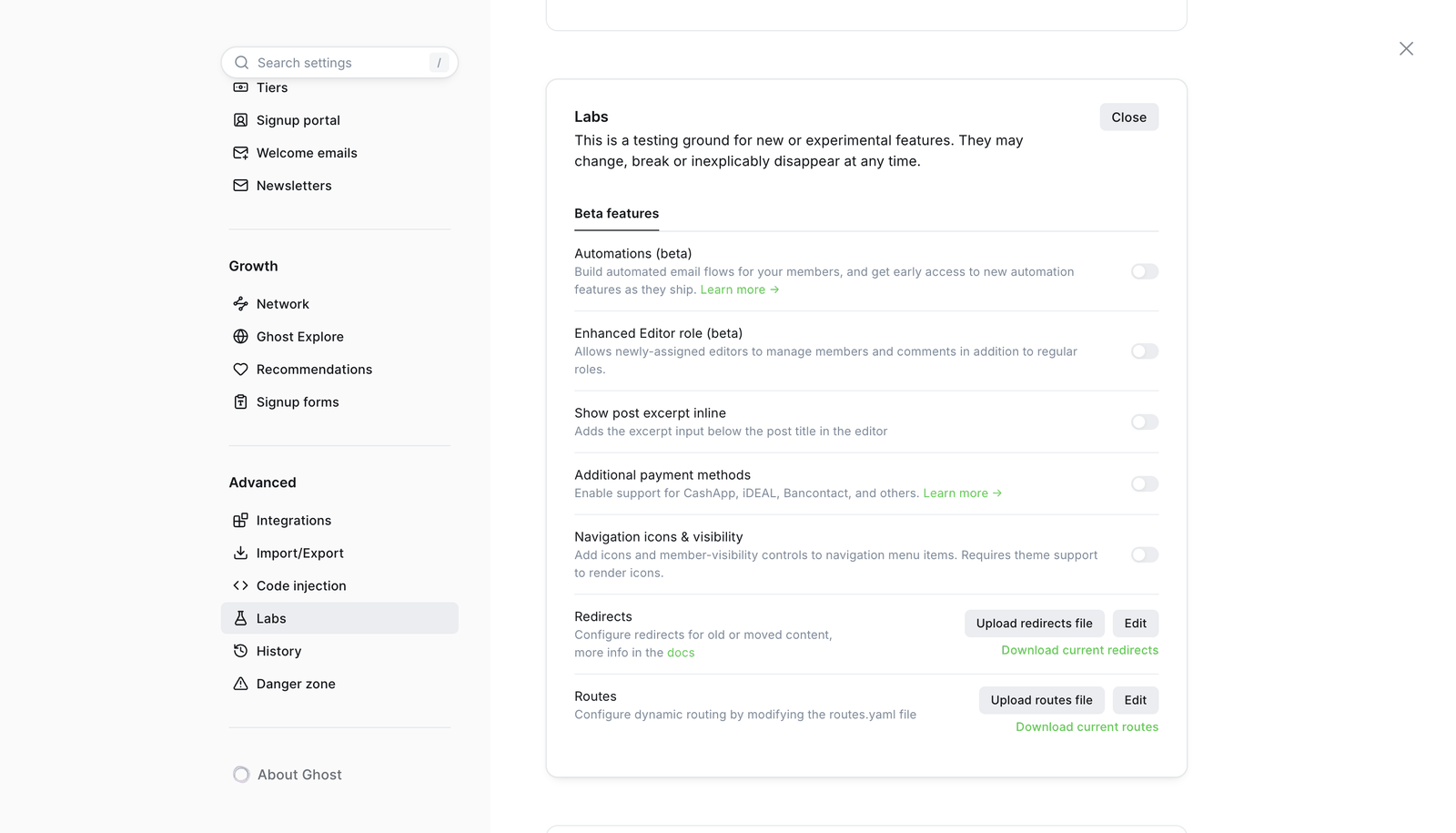
Uploading a routes file replaces the publication's entire active routing configuration. Download the current file from Settings > Advanced > Labs first, merge this channel into it without removing unrelated routes, collections or taxonomies, then upload the completed file and check that /, /articles/, a tag URL and an author URL all resolve.
Directory pages
The topics, authors and editions directories are ordinary Ghost pages with a custom template selected, not YAML routes. Create each page, set its slug, choose the matching template in the page settings and publish it.
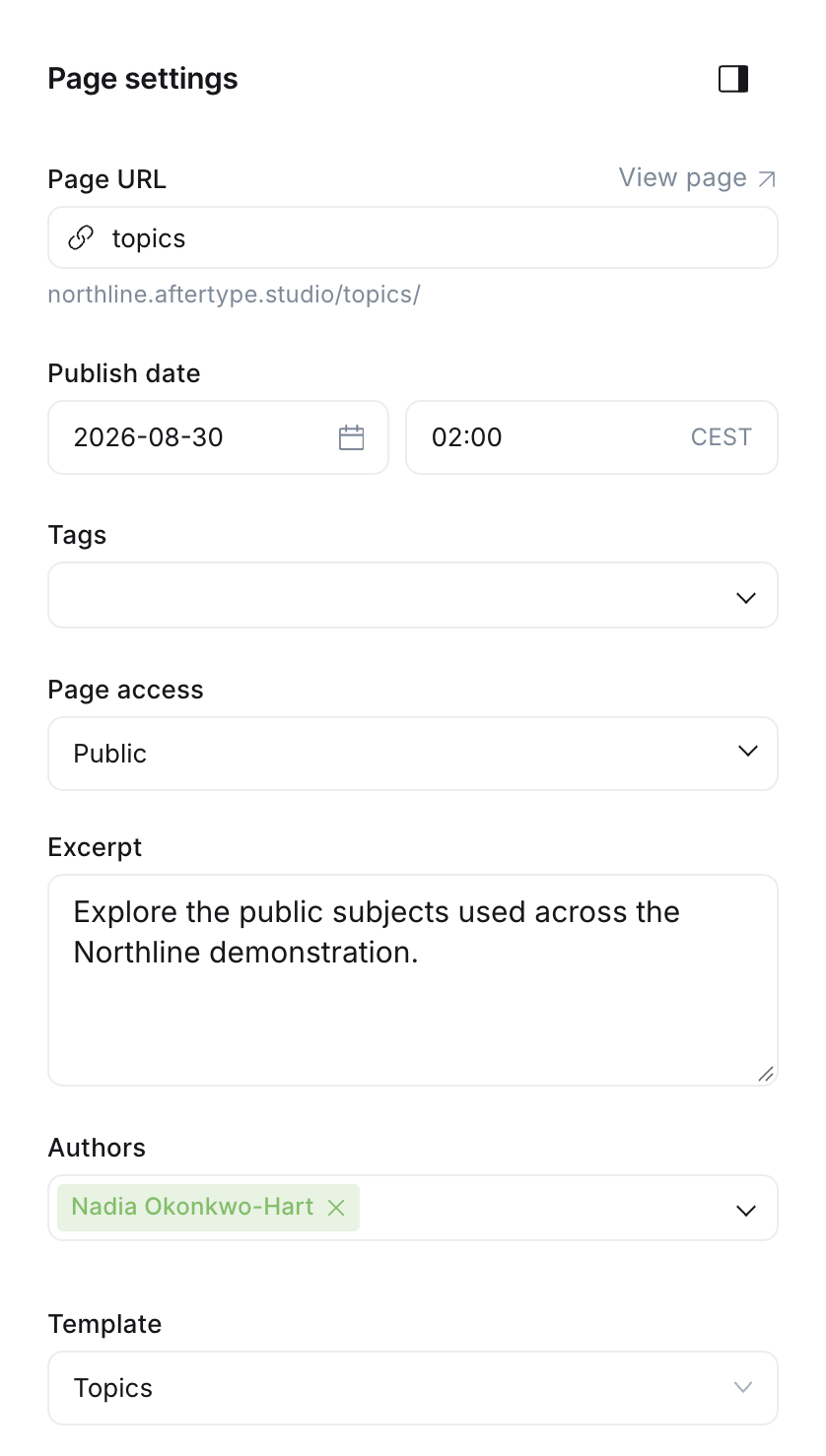
| URL | Page slug | Custom template |
|---|---|---|
| /topics/ | topics | Topics |
| /authors/ | authors | Authors |
| /editions/ | editions | Editions |
These templates do not render the page body. Northline uses the page title and its custom excerpt as the directory introduction, so write the excerpt as editorial copy rather than leaving it empty.
Homepage
The homepage is a fixed editorial composition rather than a feed. Northline builds it in this order: an editorial opening, the current edition, editors' picks, latest thinking, up to three topic sections, selected work, fields of interest, and the newsletter block. Optional sections hide themselves cleanly when their content does not exist.
Which posts appear where is driven by Ghost tags and featured status, not by hardcoded IDs.
| Section | Populated by | Shows |
|---|---|---|
| Editorial opening | Publication description | Statement plus a short editorial note |
| Current edition | Newest featured post | Cover story plus two supporting stories |
| Editors' picks | #editors-pick | The four newest matching posts |
| Latest thinking | Main post collection | Up to seven posts after the first three |
| Topic sections | Up to three tag slugs | A lead story plus three per topic |
| Selected work | #case-study | The three newest case studies |
| Fields of interest | Public tags by post count | Up to eight, edition tags excluded |
| Newsletter | Ghost memberships | Signup, or an account action for members |
Topic sections take public tag slugs, not names or URLs. Internal tags beginning with # cannot be used there. If no post is featured, the newest post becomes the cover story.
Theme settings
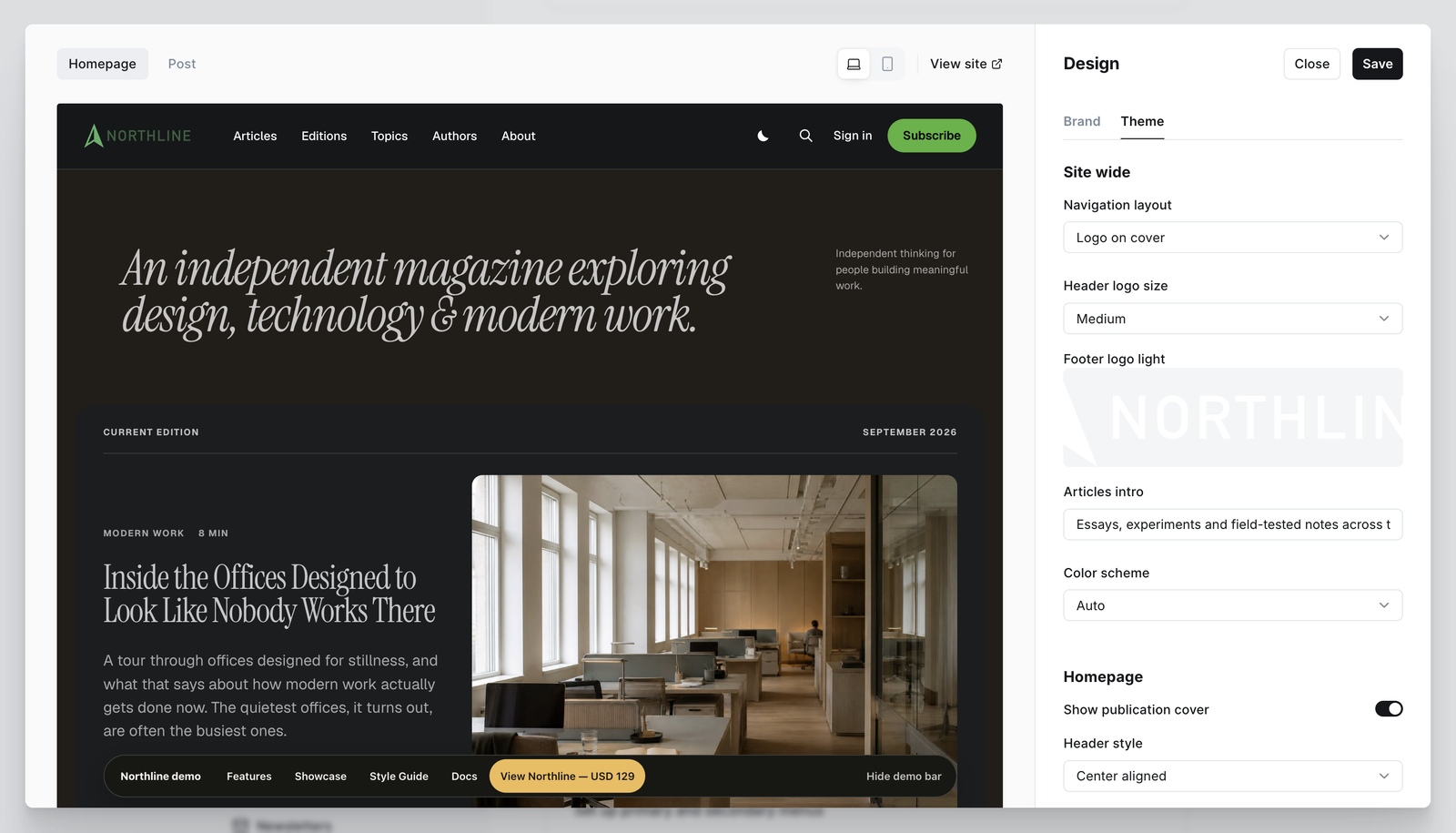
Ghost separates Brand settings from theme settings. Configure the publication title, description, accent colour, logo, icon and cover under Brand first; the description in particular is prominent on the homepage and repeated in the footer. Theme settings then live under Settings > Design & branding > Customize > Theme.
| Setting | Controls |
|---|---|
| Navigation layout | Logo on cover, logo in the middle, or a stacked masthead |
| Header logo size | Small up to 190x20, medium up to 240x32, large up to 300x44 px |
| Footer logo light | A light logo for the dark footer, up to 160x32 px |
| Color scheme | Light, dark, or auto with a manual visitor toggle |
| Articles intro | The introduction beside the /articles/ heading |
| Homepage topic one, two, three | The tag slugs behind the three topic sections |
| Show editors picks | Whether the editors' picks shelf appears |
| Homepage editorial note | The short line beside the opening statement |
| Newsletter heading and text | Copy in the homepage newsletter block |
| Post image style | Wide, full, small or hidden article feature images |
| Comments heading and introduction | Editorial copy around Ghost's comments |
| Show related posts | Up to three posts sharing the article's primary tag |
Interface labels such as Current edition and Latest thinking are translated theme language rather than individual text fields. Changing those, the page composition, the typefaces or the motion design means forking the theme and rebuilding the release zip; direct edits to an installed theme are overwritten by the next update. Use Code Injection only for small, reversible additions.
Members and comments
Northline presents Ghost's native members, Portal, newsletters and comments. Ghost keeps ownership of accounts, access rules, emails and billing; the theme only provides the interface around them.
With memberships enabled in Ghost Admin > Settings > Membership, Northline can show sign-in and subscribe actions in the header, the homepage newsletter block, member actions in the footer, a signup prompt on eligible posts, and a branded panel around Ghost's comments. Public, members-only and paid content all follow Ghost's own visibility and access controls. With memberships disabled, every member-specific element is omitted automatically.
Before launching a membership site, test at least the signed-out visitor, a free member, a paid member if you use paid tiers, and an expired or cancelled account.
Localization
Northline ships with complete English and Dutch locale files covering every interface string. Switch between them by changing the publication language in Ghost Admin > Settings.
To add another language, duplicate locales/en.json, translate the strings and add the file to the theme's locales folder using Ghost's standard i18n approach.
Updates
Free updates for as long as Northline is actively maintained, including updates for new major Ghost releases.
Before updating a live publication, make the same backups as for a first install, read the changelog for anything that needs action, and test on a staging site first when you can.
Keep the filename as it is
Ghost names an installed theme after the filename of the zip you upload, not after the name inside the theme, and it stores the values of custom theme settings per theme name. Uploading northline.zip updates the theme you already have. Uploading the same release under any other name installs a second theme alongside it, starting on its defaults.
Settings with a default quietly return to that default, so the site can look broadly right while everything has been reset. Four Northline settings have no default and go visibly blank instead: the footer logo and the three homepage topic labels. Every Northline download is named northline.zip. Upload it under that name and your settings carry over. Settings that are new in a release start on their defaults until you change them.
If your theme has a version in its name
Open Settings > Design & branding and look at the theme list. A Northline named northline-1.0.2 or northline-1.0.3 came from a versioned zip, and each future update would again arrive as a new theme with empty settings. Move it back to the plain northline name once. Note your current settings and keep a copy of the footer logo first, because you will re-enter them.
- 1.Download
northline.zip. - 2.Upload it. It installs as a new theme named
northline, next to the versioned one. Nothing is lost yet. - 3.Activate
northline. - 4.Restore every setting under
Customize > Themeand re-upload the footer logo. - 5.Check the footer, the homepage and an article on the live site.
- 6.Only now, delete the old versioned theme.
Keep that order. The old theme is your rollback for as long as it exists, and it is also the last remaining record of the settings you had, so deleting it earlier turns a reversible step into guesswork. Ghost refuses to delete the active theme, so step six cannot happen before step three in any case. If your active theme is already called northline, none of this applies.
Routes stay separate
Uploading a theme never replaces routes.yaml. Only upload routes when the release notes call for a routing change, and merge rather than overwrite.
Troubleshooting
Full troubleshooting documentation ships with the theme. These are the questions that come up most often.
| Symptom | Cause and fix |
|---|---|
| The footer logo disappeared after an update | The update installed as a separate theme with empty settings. Your old settings are intact under the previous theme. See Updates above |
| The homepage topic sections went empty at once | Same cause as the footer logo: these are the settings without a default, so they are the ones that show it |
| Two Northline entries in the theme list | A versioned zip was uploaded. Follow the one-time move in Updates above |
| A single topic section is empty | Enter the public tag slug in the Homepage topic setting, not its display name or URL, and confirm the tag has published posts |
| /articles/ returns 404 | The routes file is missing or the /articles/ channel was not merged in. See Routes and URLs above |
| A directory page returns 404 | The Topics, Authors and Editions pages must be published, use the slugs topics, authors and editions, and have the matching custom template selected |
| Theme settings are missing entirely after a self-hosted update | Reactivate the theme or restart Ghost. Installing a release zip normally needs neither |
| A theme upload fails | Upload the release zip, not a source archive, and note the exact Ghost error message. It usually names the missing or incompatible file |
| Changes are not visible | Save the setting, hard-refresh the browser and clear any CDN or page cache |